WebUI Session Lifecycle
An AIMMS session and a WebUI session are not the same thing, and they do not start or stop at the same moment. The AIMMS session is the running model: it begins when the AIMMS engine starts executing your project and ends when the engine shuts down. The WebUI session is the connection between your model and a browser tab: it only exists while the WebUI library has been initialized and at least one browser tab is connected.
Anything that requires interaction with the end user through the browser —
most notably Dialog Pages, requests such as
webui::RequestPerformWebUIDialog, page navigation, and notifications —
can only work while the WebUI session is active. Requests made before the
WebUI session has started, or after it has ended, cannot be presented to
the user. For example, you should not execute a
webui::RequestPerformWebUIDialog statement when the WebUI session has
not started yet.
Lifecycle phases
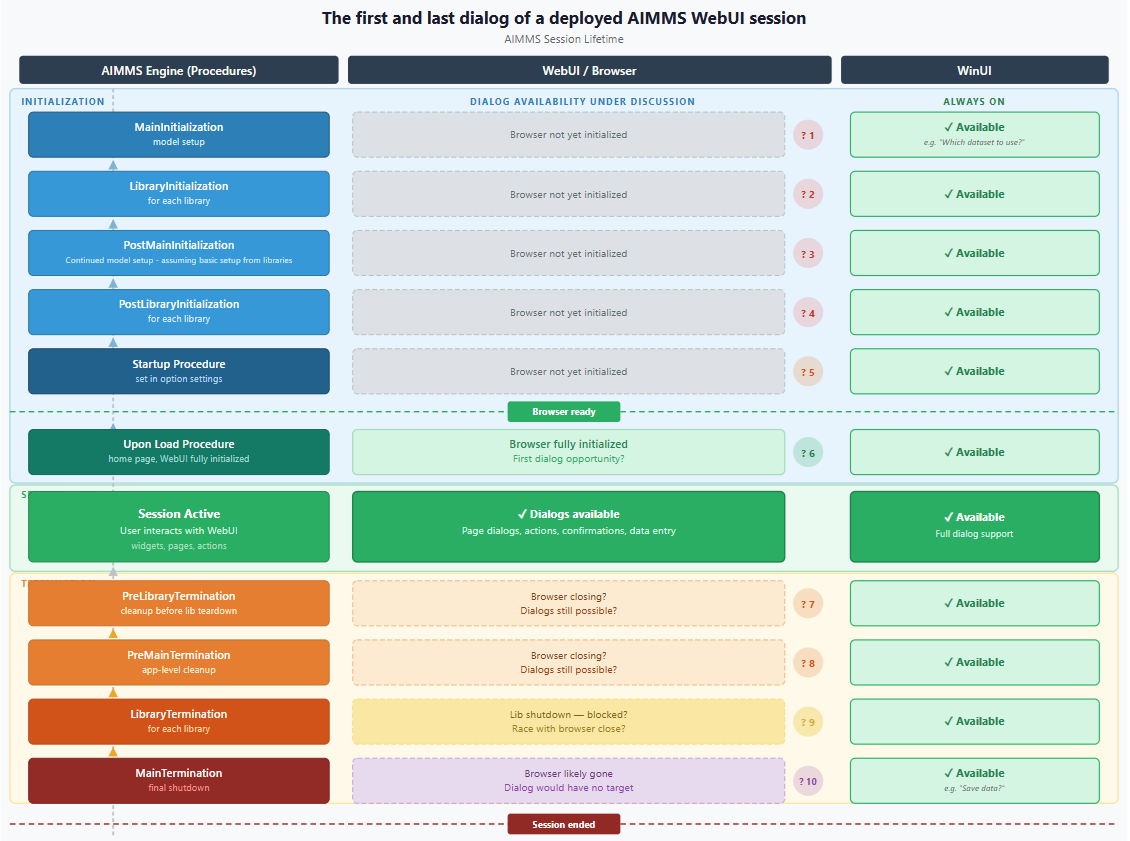
The lifetime of a session goes through the following phases:
AIMMS engine startup. The engine loads the project and executes
MainInitialization. The WebUI library is not yet initialized and no browser is connected. The WebUI session is not active. Dialogs requested here cannot be shown.Post-initialization.
PostMainInitializationis executed. On AIMMS Cloud this runs in the data session before the browser has necessarily finished connecting. Do not rely on an active WebUI session here.WebUI session active. The WebUI library is initialized and a browser tab has connected; the first page is loaded. The first model-side moment that is guaranteed to run inside an active WebUI session is the upon-load (page open) procedure of your home page: it is triggered by the browser loading that page, so a connected browser is present by definition. From this moment on, dialogs, side panels, notifications and page navigation work as expected. The session remains active for as long as at least one browser tab is connected.
WebUI session ends. The session ends when the last browser tab is closed, the end user ends the session from the browser, the session times out, or the application is stopped. From this moment on, no dialog or page can be presented anymore.
AIMMS engine shutdown.
PreMainTerminationandMainTerminationare executed while the engine shuts down. The WebUI session has already ended (or is ending). Dialogs requested here cannot be shown. For example, a “Do you want to save your data?” dialog inMainTerminationwill never reach the end user.
How to know whether the WebUI session is active
The WebUI system library exposes the current frontend state through the declarations described in Public WebUI Frontend State Support Declarations:
webui::AllOpenWebUITabs— contains one element (a UUID) for every browser tab currently connected to this session.webui::LastActiveWebUITab— the UUID of the currently active tab, or empty when there is none.
Important
The values of webui::AllOpenWebUITabs and
webui::LastActiveWebUITab are only updated when the
webui state support option is enabled in the
Experimental Features. Starting with
WebUI 26.11 this option is enabled by default. If you switch it
off, these identifiers remain empty and cannot be used to detect an
active WebUI session.
You can therefore check for an active WebUI session from your model as
follows (with webui state support enabled):
Parameter pWebUISessionIsActive {
    Definition: Card(webui::AllOpenWebUITabs) > 0;
}

! Only present the dialog when a browser is actually connected:
if pWebUISessionIsActive then
    webui::RequestPerformWebUIDialog(
        title   : "Select dataset",
        message : "Please select the dataset to work with.",
        actions : sActions,
        onDone  : 'pr_OnDatasetSelected');
else
    ! Fall back: log, choose a default, or defer to first page load.
    ...
endif;
How to know when the WebUI session is closed
The session is closed when webui::AllOpenWebUITabs becomes empty
(equivalently, when webui::LastActiveWebUITab is empty). Note that:
Closing a single tab while others remain open does not end the session; only the last tab counts.
On AIMMS Cloud, a closed tab may be followed by a reconnect; the session itself ends according to the configured session timeout.
By the time
MainTerminationruns, the WebUI session should be considered closed. There is no opportunity to interact with the user anymore.
Guidance for applications converted from WinUI
In WinUI, the user interface is available during the entire lifetime of
the AIMMS session, so it was natural to present a dataset-selection
dialog in MainInitialization and a “Save your data?” dialog in
MainTermination. In WebUI this pattern no longer works, because both
procedures run outside the active WebUI session. Instead:
First dialog (e.g. dataset selection): trigger it from the WebUI side once the session is active — for example from a landing page, a page-open procedure of your first page, or a workflow step — rather than from
MainInitialization.Last dialog (e.g. save before closing): offer saving through an explicit UI element — a page action, a button, or a dedicated “Exit” page — rather than from
MainTermination. If unsaved changes must never be lost, save them automatically inPreMainTerminationwithout asking, since asking is no longer possible at that point.
Note
If a dialog is requested while no WebUI session is active — too early, too late, or with no browser connected — the request cannot be fulfilled.