Application Defaults Settings
The application options under the Application Defaults tab of the Application Settings are explained below.
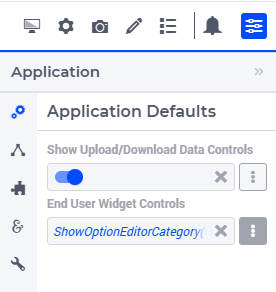
Show Upload/Download Data Controls
The table widget features the option ‘Show Upload/Download Data Controls’ (on the ‘Miscellaneous’ tab) which allows to switch on/off the possibilities to upload/download table contents on a “per widget” level.
Starting from AIMMS 4.89, this global application setting (also called ‘Show Upload/Download Data Controls’) was introduced, with which you can override the default for all tables at once. So, if the option on the table level has not been specified, then it will inherit automatically the value of this global application option.
End User Widget Controls
This feature was introduced as an experimental feature in WebUI version 25.2, and as of WebUI 26.11 it is enabled by default. It is currently in the Release Candidate development stage, meaning it is stable and being prepared for General Availability and full support.
This feature allows app developers fine-grained control over which option editor tabs end users can see and edit in the widget/page/App settings.
When the feature is enabled, an “End User Widget Controls” option is introduced in the App Settings - Application Defaults tab. This option can be set with a (binary) parameter indexed over the pre-defined set webui::OptionEditorCategories from the WebUI System Library — a non-zero value grants end users access to that category, and a zero value hides it.
This setting only affects End User mode: app developers always see every option editor tab and category, regardless of how this setting is configured.
Important
Enabling “End User Widget Controls” makes the older “Limited Option Editor” option obsolete: it is removed from the Miscellaneous tab, and any value previously configured there is ignored.
If your application relied on Limited Option Editor to restrict the option editor categories accessible to end users, you must reconfigure that access using End User Widget Controls instead. Until you do so, all option editor categories are accessible to your end users by default.
This setting only matters when “UI Editable” (on the Miscellaneous tab) is set to “true”. If “UI Editable” is “false”, “End User Widget Controls” has no effect, since access to the option editor is hidden entirely.
When “UI Editable” is “true” and “End User Widget Controls” is properly configured with an indexed (binary) parameter, end users get access only to the option editor categories for which the parameter evaluates to a non-zero (“true”) value.
One limitation to keep in mind: this only applies to categories in the pre-defined set webui::OptionEditorCategories. The Advanced section, for instance, is never editable by end users, regardless of this setting.