Experimental Features
Experimental Features are features that have not been ironed out fully yet, but which you can enable to try out and share feedback about. Based on the usage and feedback the feature eventually becomes official in the WebUI or might be removed if proven not to work well or not to add enough value to users.
Important
How to enable or disable Experimental Features
To access and enable/disable the list of experimental features, please follow the below steps:
You need to press the three-key combination
CTRL+SHIFT+.(Control Key + Shift Key + Dot/Fullstop Key).Once you have keyed in this combination you will see a new icon
 in the Application Toolbar in the top right corner.
Clicking on the icon will reveal the Experimental Features menu on the left of your screen.
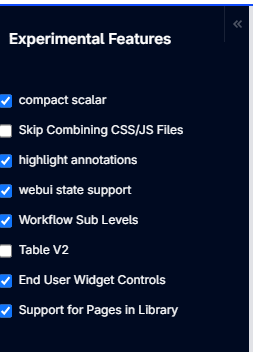
To enable or disable a feature, just check/uncheck the checkbox for the respective feature. After changing a checkbox, either click the “Reload” text button or refresh the page. The change only takes effect once the page has been reloaded.
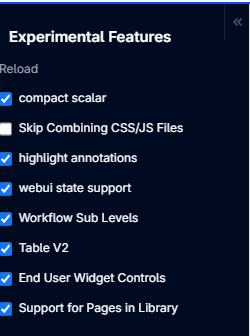
Current list of Experimental Features
Experimental Feature |
Description |
Default |
Version introduced |
Current Development Stage |
General Availability expected by |
|---|---|---|---|---|---|
Compact Scalar |
This feature allows you to condense the height of the scalar to a fixed size, similar to a label or button widget. An option |
On |
AIMMS 4.46 |
Release Candidate |
Q4 2026 |
This feature allows you to use annotations to responsively highlight certain tuples in the Table and the Gantt Chart widget. Read more here. |
On |
AIMMS 4.68.5 |
Release Candidate |
Q4 2026 |
|
WebUI State Support |
This feature updates the element parameters webui::CurrentPageId and webui::CurrentSidePanelPageId with the pageId of the current page the user is viewing and the pageId of the open Side Panel page. |
On |
AIMMS 4.72 |
Release Candidate |
Q4 2026 |
| Table V2 | This option activates the enhanced version of the Table widget type. This upgraded Table version includes all the functionality of the current Table version, it also includes advanced option editors that allow per-identifier and per-index configurations. This enables greater control over settings like Decimal Places, Show Units, and Visibility for individual identifiers. This update also lays the groundwork for future enhancements to the Table widget. When enabled, all existing tables in the application will be automatically upgraded to the newer version. While doing so, if there are exceptions — such as Display-Domain or Store-Focus entries that cannot be mapped to their corresponding identifiers or indices — these cases will be ignored, requiring manual corrections. We recommend keeping Table V2 enabled going forward; disabling the feature only reverts the Table widget to its previous behavior. |
On |
Release Candidate |
Q4 2026 |
|
| End User Widget Controls | This feature allows the app developer to provide more fine-grained control over which option editor categories are accessible to the end users. When this feature is enabled, the older Limited Option Editor option (on the Miscellaneous tab) becomes obsolete and is no longer available. Applications that relied on Limited Option Editor to restrict end users’ access to the option editor will need to reconfigure that access using the new End User Widget Controls option instead — otherwise, by default all option editor categories become accessible to your end users. |
On |
WebUI Library 25.2 |
Release Candidate |
Q4 2026 |
| Support for Pages in Library | This feature is enabled by default, and it allows support for WebUI Pages within Libraries. This powerful capability promotes modular development and encourages the reuse of WebUI pages across multiple projects. By enabling this feature, developers can organize and manage WebUI content within separate libraries, leading to improved maintainability, scalability, and team collaboration, especially in large or complex applications. This approach ensures UI consistency, reduces code duplication, and significantly lowers maintenance overhead. |
On |
WebUI Library 25.3 |
Release Candidate |
Q4 2026 |
| Gantt Chart v2 | WebUI now includes the Gantt Chart V2 widget type, a redesigned and enhanced version of the existing Gantt Chart widget. Enabling this feature makes the Gantt Chart V2 widget type available to add to a grid-layout page. |
On |
WebUI Library 25.8 |
Release Candidate |
Q4 2026 |
Skip Combining CSS/JS Files |
This option allows you to load the CSS and JS files separately. Eventually, this feature will be removed as the new setup is applied. Read more about the improvements here. This option is included to enable fallback to the old setup in case issues arise with the new setup. You will need to close, reopen the project, and relaunch WebUI each time this option is toggled. |
Off |
AIMMS 4.78 |
Feature Standby |
Q4 2026 |
Keep old fonts |
Fall back to the ‘Roboto’ and ‘Montserrat’ font families that were previously (before 25.2) in use for WebUI, instead of ‘Inter’. This option is included to allow an easy return to familiar fonts, in case issues arise with the new setup. You will need to reload the page to allow the configuration to change. Please note that this is not a 100% return to the old situation and leaves some sizing and spacing changes in place. Moreover, most parts that are exclusively used by application developers (App and Page management in the sidebar, option editors in the side panel, and some dialogs) will still use the ‘Inter’ font and the new sizing and spacing. The fallback aims only to preserve page layouts and the amount of content shown in widgets. Finally, please know that enabling this feature toggle will somewhat hurt the initial page loading experience of an application, due to the need to (also) load the old fonts and doing so in a less efficient way than the main font families. You’ll be able to see the font fall back as it loads for the first time. |
Off |
WebUI 25.2 |
Feature Standby |
Q4 2026 |
Important
Development Stages
Feature Standby - An option that allows you to use the earlier version of a General Availability feature which has recently been introduced. This option will be removed after a period of time, allowing models to be updated and adjusted to the new feature.
Feature Candidate - The feature is available to be used and tested, but might have a change in implementation. There is a chance that we replace this feature with an alternative improved feature as well.
Beta - The feature is available to be used and tested. We collect feedback and suggestions for further improvement that may or may not be implemented before General Availability.
Release Candidate - The feature is stable and ready to be released unless significant bugs emerge.
General Availability - The feature is officially released and supported as part of the SLA.
Note
The development stages and General Availability versions for the experimental features can change based on certain conditions.