Secrets
The Secrets page provides a centralized interface to manage directories and secrets within the AIMMS PRO environment. It allows authorized users to securely organize, store, and control access to sensitive information required by applications.
Overview
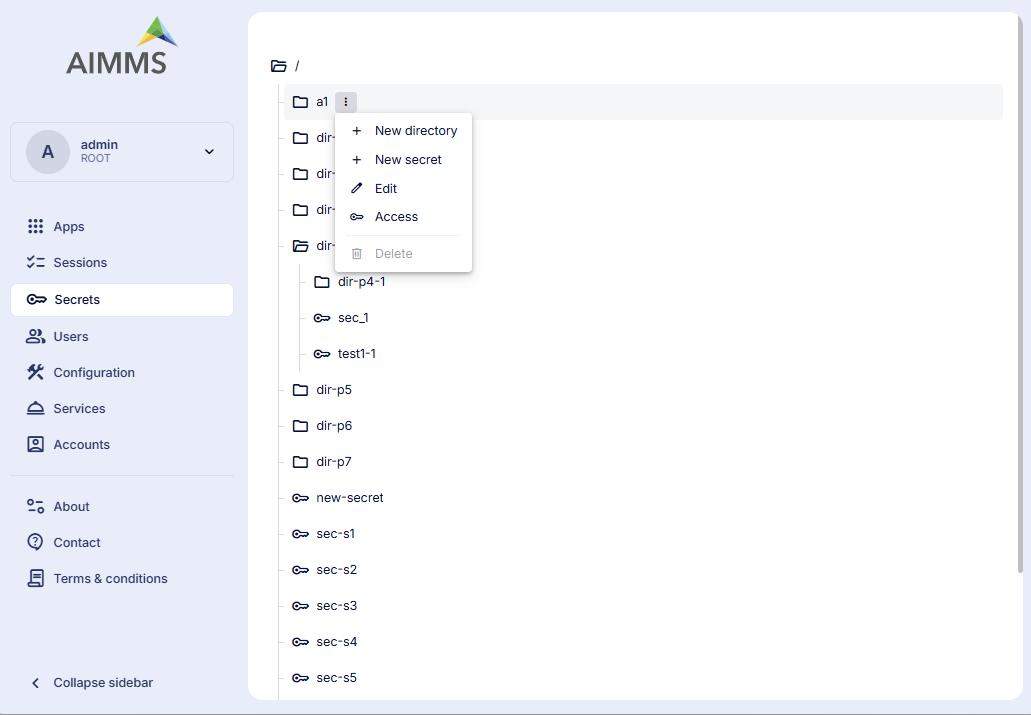
The right-hand side of the page displays a tree view representing the hierarchical structure of directories and secrets,
Directories: Directories are shown with a folder icon and can contain,
Subdirectories
Secrets
Secrets: Secrets are shown with a key icon and represent stored sensitive values.
The root directory (/) is displayed at the top of the tree.
Directories can be expanded or collapsed to navigate through the hierarchy.
Managing Directories and Secrets
Depending on your access permissions, you can perform the following actions:
Browse directories and secrets
Create new directories
Create new secrets
Modify existing secrets
Delete secrets or empty directories
All actions are performed within the context of the selected directory or secret.
Access and Permissions
By default, the root directory (/) is available only to Admin users.
Non-admin users will not see any items unless access is explicitly granted.
Access is managed per directory or secret and is enforced strictly on the selected item.
Only Admin users can:
Grant access to users or groups
Modify or revoke existing access permissions
Manage access for any item
Managing Access
Item access can be configured at either the group level or the user level.
When an item is created, it inherits access permissions from its parent directory. (Note: Parent permissions are used only at creation time and do not grant implicit access afterward)
Access is always evaluated on the resource itself, not on parent directories.
Access Types
- Directories
read - Allows listing items under the directory only
read_write — Allows listing items, creating new items under the directory, and deleting empty directories
- Secrets
read — Allows reading the secret content only
read_write — Allows reading, modifying, and deleting the secret